Robert’s Ramblings

a little on life, the universe and everything… …and maybe the odd bit of scuba diving too!

366 Days of 2012, Day 131 – Iron Pickets


I think it’s amazing the variety of styles and materials and states of care that suburban front fences cover.

While out and about today I was noticing how there were fence themes in clusters as I made my way while out driving through the suburbs. There were brush themes, colourbond themes, wrought iron themes and stone pillar themes just to name a few. The clusters clearly showed how neighbors like to copy each other’s ideas.

As I drove through down one particularly lovely and shady tree line street one fence really stood out. I guess it was quite an ordinary fence really but the combination of painted wrought iron, sandy stone pillars, immaculate garden and beautifully maintained old bungalow just worked!

I pulled over, jumped out of the my car and framed one image!! My fastest photo shoot ever!


Photo: Robert Rath, ‘366 Days of 2012, Day 131 – Iron Pickets’. 1/100 sec at 40mm f/4.0, ISO 160

366 Days of 2012, Day 130 – Leaky Boat


If you spent six months in this leaky boat you’d be be well fed, have a fantastic water view but the rest of the experience would deteriorate rapidly from there!

The challenge is to work out where it is! 😉

This is my third HDR image and I must admit that it is a lot of fun with endless possibilities for artistic input. This is however my first image with my image workflow under control. It goes something like this.

1. Capture the raw frames and store in my primary workspace.
2. Edit the render settings for the raw images and export them as temporary 16bit tiff input files (discarded later).
3. Process the HDR image and then export both the XMP settings file with the tone mapping details and the HDR output file as a 16bit TIFF back to be stored with the original raw files.
4. Complete any post processing treating the HDR output files as a new raw file.

Basically this process ensures I can recreate verbatim the same processing from raw files to final rendered JPG again in the future so I never ever need to store a range of rendered JPG files. I simply render the JPG files I need when I need them and I can revisit the HDR process if I need using virtual copies of the original raw file in order to distinguish different HDR processing paths. This last point is imported as I may want to use multiple HDR images in a layer stack for more artistic control. Then again maybe I won’t.


Photo: Robert Rath, ‘366 Days of 2012, Day 130 – Leaky Boat’. 1/(125,640,2500) sec at 40mm f/11, ISO 500 hdr

366 Days of 2012, Day 129 – Grimy Graffiti


Adelaide has some wonderful graffiti artists whose talents are evident in any number of public places. This is not one of them!

Here this grotty opportunistic scrawl in the makeshift canvas of grime on steel has more to do with attitude than art. Strong words, names and filth marked this place.

I felt the need to capture this scene but not to linger any longer than I needed.


Photo: Robert Rath, ‘366 Days of 2012, Day 129 – Grimy Graffiti’. 1/5 sec at 17mm f/22, ISO 200

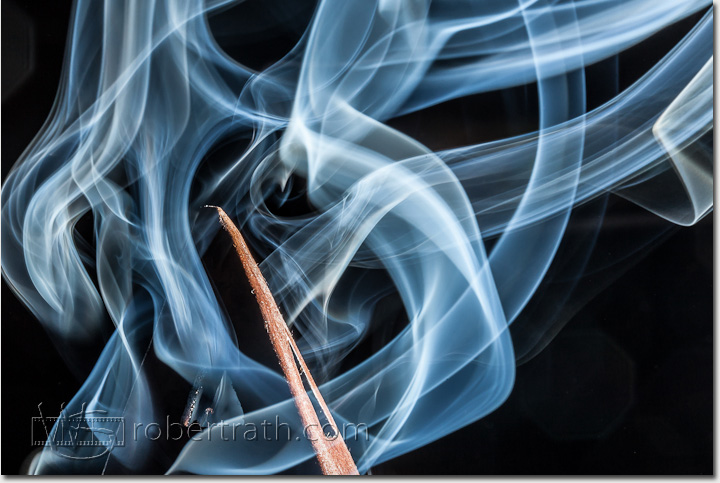
366 Days of 2012, Day 128 – Incensity


I’ve been imagining photographing candles for a while now. Thinking about the different aspects of flame and smoke.

While working today at my desk I became aware of a sweet cinnamon aroma permeating the house. I looked for the source of the smell and all of a sudden I realised the smoke from the incense my daughter was burning would make a very interesting subject.

So armed with a 100mm macro lens and strobe on a sync cord I caught four images before the burning ended and the smoke vanished.


Photo: Robert Rath, ‘366 Days of 2012, Day 128 – Incensity’. 1/200 sec at 100mm f/25, ISO 100 + strobe

366 Days of 2012, Day 127 – Rotting Colour


The problem with HDR is how to manage it!

This image taken here at West Beach, a clump of rotten seaweed is actually 3 images taken 2 stops apart. The role and legitimacy that HDR processing has in photography is beyond the scope of this post but once a digital image maker has chosen this path there is a very big workflow challenge immediately faced.

We now have very good image processing workflow tools such as Aperture and Lightroom which model workflow on non-destructive additive steps. Put simply, we start with our original and each step of process such as tonal, colour, sharpness or touch up is laid out in steps which define how the final image will look without ever changing the original.

With HDR we are in trouble unless care is taken to integrate your HDR tool such as Photoshop or Photomatix into your particular workflow such that the integrity and repeatability of the process can be managed from originals to final rendering.

A good process will achieve the following points:

1. The process should preserve all original images and clearly link them back to the final rendered HDR image.
2. The process should minimise any intermediate images that need to be kept. Preferably there should be none but mostly one intermediate can’t be avoided.
3. The HDR process settings should be kept as in-image metadata if possible otherwise a setting file needs to be kept independently for each final.

So why does this matter? With the size of digital raw files now coming from recent 20-40 megapixel cameras it is quite easy to take up to 500MB or more per image in a HDR project. Any process which creates or needs multiple copies will not only burn your hard drive but also make managing your HDR project messy and unwieldy. The second issue is that more often than not you will want to come back to your originals and make a little tweak here or there or produce new rendered final images of different quality or sizes. A well constructed and disciplined workflow will make this easy and not the nightmare it otherwise could become.

Have a play with HDR for a little fun and something new but if you get the bug then get your workflow sorted out quickly or you risk being buried!


Photo: Robert Rath, ‘366 Days of 2012, Day 127 – Rotting Colour’. 0.5+2+8 sec at 17mm f/22, ISO 100 hdr

366 Days of 2012, Day 126 – Captive


Where do you keep your prisoners? In your dungeon of course! Well nowadays we call it a cellar and our prisoners are wine, preserves, potatoes, onions and other goodies!

When I grew up our dungeon was this amazing room under the house, full of cobwebs, damp musty smells and produce long forgotten. My parents had stopped going down there due to the stooping required to navigate the awkward steps and so we were sent on occasional errands for one thing or another. If anything down there was forgotten, it stayed that way.

Where we now live we have no dungeon. I’m sure they must have gone out of fashion some time back in the 70s. I miss those musty smells and those cobwebs. The next home we buy will have a dungeon for sure!!

So how do we keep our prisoners captive with no dungeon? In string bags!


Photo: Robert Rath, ‘366 Days of 2012, Day 126 – Captive’ 6 sec at 40mm f/16, ISO 100

366 Days of 2012, Day 125 – Norwood Rings


I love some of the beautiful expressions of cultural and civic pride we have adorned our city with. This sculpture in particular caught my attention a couple of years back and I have only now made an effort to go out of my way to photograph it.

Here’s just one of the many quotes that can be read from the rings.

‘Going back 50 years ago I recall fond memories of walking down Margaret Street on warm summer evenings and taking in the festive atmosphere created by the Italian families who would sit on their front porches eating, drinking, laughing and talking to one another across the street.’

It was quite busy around 7pm and trying to get a nice long exposure without glaring white car headlights presented a bit of a challenge. In the end I compromised on a high ISO and decreased F-Stop to limit the exposure to 20 seconds.


Photo: Robert Rath, ‘366 Days of 2012, Day 125 – Norwood Rings’. 20 sec at 17mm f/10, ISO 800

366 Days of 2012, Day 124 – Expressions of Coffee


One of the most self-indulgent investments I have ever made in kitchen appliances is my espresso machine.

Not one of your all singing, all dancing fully automagic button operated machines but a good old fully manual workhorse. First I get to choose the beans I want, next I have to choose how fine to grind. After that comes the question of how deep and how to pack the cup and finally how long to wait between pre-charging and pouring the shot.

It’s a very engaging process with so many variables coming together for the perfect cup!

This photo was taken at a very slow shutter speed for maximum natural lighting with a bit of fill flash behind a soft diffuser to freeze the pour and bring out the highlights.


Photo: Robert Rath, ‘366 Days of 2012, Day 124 – Expressions of Coffee’. 1/3 sec at 100mm f/4.5, ISO 100 + fill strobe

366 Days of 2012, Day 123 – Sunbeams


Yeah I know this one’s a little clichéd and something you are more than not likely to find on some evangelical pamphlet but there it was this evening and how could I not pull over, grab my camera and take a few shots.

I’m not sure this type of image qualifies as a sunset. That was at least an hour or more away. Seascape or sunscape or evangelical pamphlet cover; call it what you will, it was certainly a beautiful sight.


Photo: Robert Rath, ‘366 Days of 2012, Day 123 – Sunbeams’. 1/250 sec at 40mm f/11, ISO 100


366 Days of 2012, Day 122 – Happy Gee


I wanted to take a photo of the beautiful orange gerberas that Jennifer bought but I also wanted to do it in a way I have never tried before.

My aim was to create an image of a beautifully and evenly lit bloom in a perfectly black background (in the camera an not in Photoshop). To achieve this I knew I had to strobe light the flower as brightly as possible so that not only would all natural lighting be eliminated but also all the ambient reflected light from the strobe would also be so dim as to be eliminated.

This required three things, I had to get the flower as close to the lens as possible, I had to make the exposure as slow as possible and I had to use as much strobe power as possible.

After many attempts I almost gave up. When the strobe was very close the the flower was unevenly lit, when too far away or diffused the background was lit up in the image. What I needed was a macro strobe which is a circular ring of flash which circles the lens creating even light from all sides.

In the end I solved the problem by firing the strobe 4 times for the same image. Once from the left, the right, the bottom and the top. It worked so well I am looking forward to trying this technique in other challenging situations.


Photo: Robert Rath, ‘366 Days of 2012, Day 122 – Happy Gee’.1/200 sec at 34mm f/22, ISO 200 + composite strobe